CMS
WordPress
A plugin that saves every file tinypica finishes to the Media Library.
For a site that publishes on WordPress: a plugin of one file that listens for export.ready, and saves each file tinypica finishes to the Media Library. It was run on a WordPress site as it is shown here.
The plugin
<?php
/**
 * Plugin Name: tinypica
 * Description: Saves every file tinypica finishes to the Media Library, as its webhooks announce them.
 * Version: 1.0.0
 * Requires PHP: 8.1
 */

// In wp-config.php:
//
//   define('TINYPICA_API_KEY', 'tp_…');
//   define('TINYPICA_WEBHOOK_SECRET', 'whsec_…');
//
// Then, on tinypica's API screen, an endpoint with export.ready ticked:
//
//   https://your-site.example/wp-json/tinypica/v1/webhook

defined('ABSPATH') || exit;

const TINYPICA_API = 'https://tinypica.com/api/v1/';

add_action('rest_api_init', function () {
    register_rest_route('tinypica/v1', '/webhook', [
        'methods' => 'POST',
        'callback' => 'tinypica_receive',
        // The signature is the permission: only tinypica can make one.
        'permission_callback' => 'tinypica_signed',
    ]);
});

// Standard Webhooks: an HMAC-SHA256 of "id.timestamp.body", keyed with the secret.
function tinypica_signed(WP_REST_Request $request): bool
{
    $id = (string) $request->get_header('webhook-id');
    $timestamp = (string) $request->get_header('webhook-timestamp');
    // Five minutes either way, so an old delivery cannot be replayed.
    if ($id === '' || abs(time() - (int) $timestamp) > 300) {
        return false;
    }
    $key = base64_decode(substr(TINYPICA_WEBHOOK_SECRET, strlen('whsec_')));
    $expected = base64_encode(hash_hmac('sha256', "$id.$timestamp." . $request->get_body(), $key, true));
    foreach (explode(' ', (string) $request->get_header('webhook-signature')) as $signature) {
        if (hash_equals($expected, preg_replace('/^v1,/', '', $signature))) {
            return true;
        }
    }
    return false;
}

function tinypica_receive(WP_REST_Request $request): WP_REST_Response
{
    // An event is sent again until it is answered, and an answer can be lost
    // on the way back: each one is taken once, and remembered for a week.
    $seen = 'tinypica_' . md5($request->get_header('webhook-id'));
    if (!get_transient($seen)) {
        set_transient($seen, 1, WEEK_IN_SECONDS);
        $event = $request->get_json_params();
        if ($event['type'] === 'export.ready') {
            // Downloaded by WP-Cron once this is answered: tinypica waits
            // 10 seconds for the answer, and a chapter takes longer to fetch.
            wp_schedule_single_event(time(), 'tinypica_save_export', [$event['data']]);
        }
    }
    return new WP_REST_Response(null, 204);
}

add_action('tinypica_save_export', 'tinypica_save_export');

function tinypica_save_export(array $file): void
{
    // Your key goes to tinypica and nowhere else.
    if (!str_starts_with($file['downloadUrl'], TINYPICA_API)) {
        return;
    }
    require_once ABSPATH . 'wp-admin/includes/file.php';
    require_once ABSPATH . 'wp-admin/includes/media.php';
    require_once ABSPATH . 'wp-admin/includes/image.php';

    $tmp = wp_tempnam($file['filename']);
    $response = wp_remote_get($file['downloadUrl'], [
        'headers' => ['Authorization' => 'Bearer ' . TINYPICA_API_KEY],
        'timeout' => 300,
        'stream' => true,
        'filename' => $tmp,
    ]);
    if (is_wp_error($response) || wp_remote_retrieve_response_code($response) !== 200) {
        @unlink($tmp);
        error_log('tinypica: could not download ' . $file['filename']);
        return;
    }
    $attachment = media_handle_sideload(['name' => $file['filename'], 'tmp_name' => $tmp], 0);
    if (is_wp_error($attachment)) {
        @unlink($tmp);
        error_log('tinypica: ' . $attachment->get_error_message());
        return;
    }
    // Where a theme or another plugin takes over: a manga reader's chapter
    // post, a download link, a message to your team.
    do_action('tinypica_export_saved', $attachment, $file);
}
Install it
- Save the file as
wp-content/plugins/tinypica/tinypica.php, and activate tinypica under Plugins. - Add the key and the signing secret to
wp-config.php, above the line that says to stop editing:define('TINYPICA_API_KEY', 'tp_…'); define('TINYPICA_WEBHOOK_SECRET', 'whsec_…'); - On the API screen, add an endpoint at your site's address, with
export.readyticked:https://your-site.example/wp-json/tinypica/v1/webhook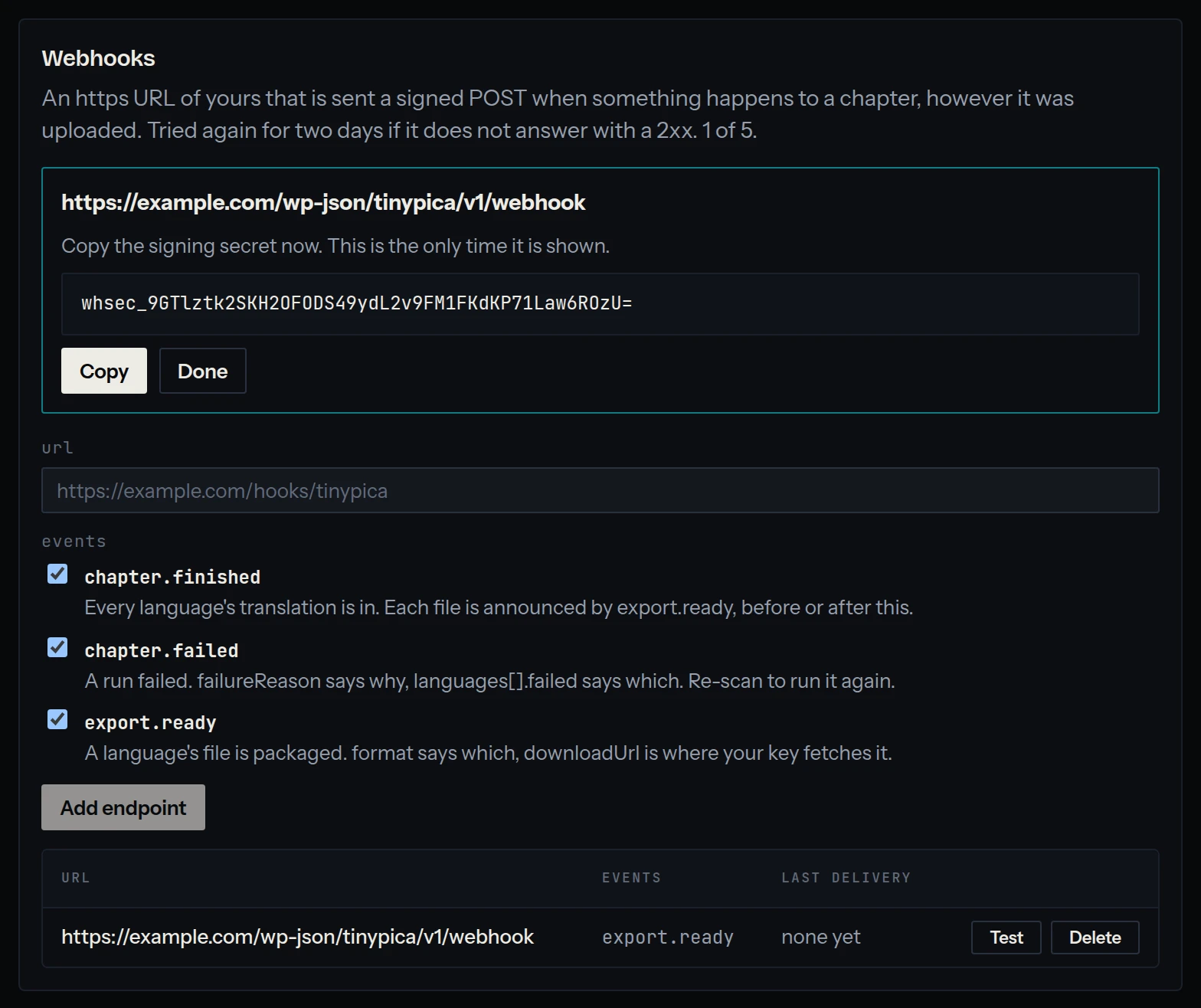
- Press Test. A delivered ping means the site answers and the secret matches.
From then on, the file of every chapter that finishes lands in Media, under Library.
How it works
- The signature check is the route's permission: a delivery without a good one is a
401, and nothing else runs. - Each event is taken once. Its
webhook-idis remembered for a week, so a repeat is answered and ignored. - The download happens after the answer, in a WP-Cron event: tinypica waits ten seconds for an answer, and a chapter can take longer to fetch.
- The key is only ever sent to tinypica: a
downloadUrlanywhere else is skipped.
Taking it further
Once a file is saved, the plugin fires tinypica_export_saved with the attachment's id and the event's data. That is the place to hand the chapter to a manga reader theme, or anything else your site does with it:
// In your theme's functions.php, or a plugin of your own: a draft post for
// every file, with a link to it, to be finished and published by hand.
add_action('tinypica_export_saved', function (int $attachment, array $file) {
    wp_insert_post([
        'post_title' => "{$file['filename']} ({$file['language']})",
        'post_content' => wp_get_attachment_link($attachment),
        'post_status' => 'draft',
    ]);
}, 10, 2);
On a quiet site
WP-Cron runs when someone visits the site, so on one with few visitors a file can wait. Run it from the system's cron instead, every minute, with WP-CLI:
define('DISABLE_WP_CRON', true);* * * * * cd /var/www/html && wp cron event run --due-nowHow deliveries are signed, retried and ordered is in webhooks.