Chapters
Exports
Which files a chapter gives you at each step, on which plan, and how to download them.
Downloading is free on every plan, as often as you like. Which files a chapter has depends on how far its project takes a page. See the four steps.
Formats
| File | What is in it | From step | Plan |
|---|---|---|---|
| Source TXT | The script as it was read from the pages, untranslated | 1 Text | Every plan |
| TXT | The translated script, as plain text | 2 Translate | Every plan |
| DOCX | The translated script, as a Word document | 2 Translate | Every plan |
| Clean ZIP | The pages with their original text erased, one JPEG a page | 3 Clean | Every plan |
| CBZ | The finished pages, lettered, one JPEG a page, for a comic reader | 4 Letter | Every plan |
| ZIP | The same finished pages, as plain images | 4 Letter | Every plan |
| PSD | One layered file a page, in a ZIP | 4 Letter | Studio and Scale |
TXT, DOCX, CBZ, ZIP and PSD come once for each language. Source TXT and Clean ZIP hold no translation, so a chapter has one of each.
- A script has one paragraph for each line, in reading order. A line with no translation yet appears as it was read.
- The pages in an archive are named in page order. In a CBZ or ZIP, a page with nothing translated goes in with its original text.
- A CBZ also carries the series name, the chapter’s number and title, and the reading direction, for comic readers that show them.
- A novel has the three script files and no page files.
- One file can be up to 90 MB.
Download from the chapter table
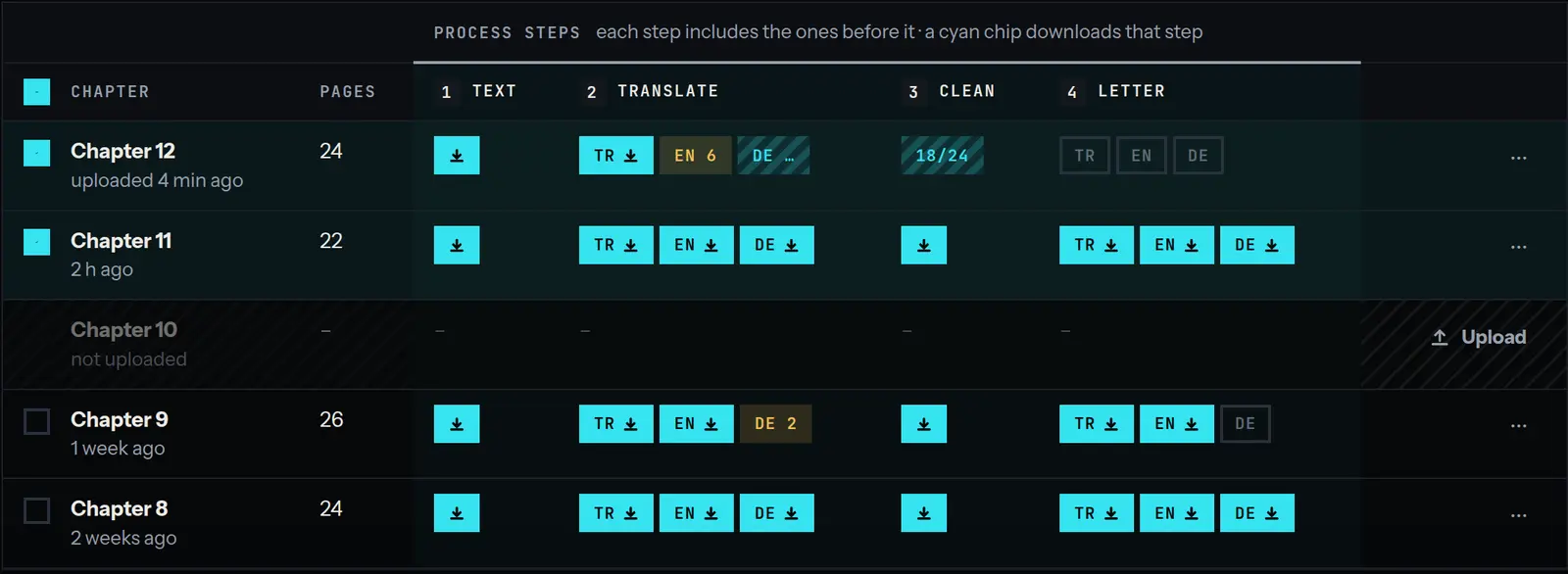
Each step the project runs has a column in the chapter table. A cyan chip with a download arrow is a step that is done: click it to download that step’s file. The chips under Translate and Letter carry a language code, one chip for each language.
| Column | The chip downloads |
|---|---|
| Text | Source TXT |
| Translate | TXT |
| Clean | Clean ZIP |
| Letter | CBZ |
A file that is already made downloads at once. Otherwise it is made first: the chip counts the pages, such as EN 9/24, and the download starts when it is done. Keep the tab open until then. If it fails, hover the chip to read why, and click it to try again.
A chip with a single number after the language, such as EN 6, has that many lines still to translate. It opens the editor instead of downloading.
Other formats, and several chapters at once
Tick the box at the start of one or more rows. A bar appears at the foot of the table with the number selected and a Download menu. The menu lists every file the project has, step by step, and language by language for the files that hold a translation: EN · ZIP, for example.
Each chapter is saved as its own file, one after another, and the bar says how far it is: “downloading 2 of 5”. A chapter that is still running is left out.
Download from the editor
In the editor, the ⋯ menu lists the same formats under Download · free. They are for the chapter you are in, in the language on screen.
The layered PSD
The PSD download is a ZIP with one PSD for each page. Every PSD has two layers: the cleaned art, and above it the lettering on a layer of its own. A letterer can hide the text or redo it without repainting the page. The lettering is a picture on its layer, not editable type.
PSD is on the Studio and Scale plans. On Free and Starter the Download menu shows it marked Studio and Scale plans. See pricing.
After you edit
A file holds the chapter as it stood when the file was made. Once you change a line, its kind or the reading order, a file made before the change is no longer offered. The next download is made from the chapter as it stands, so it includes the edit.
None of this uses credits. Credits and plans says what does.
Download with the API
Every format except CBZ and PSD can also be downloaded with the API. See the developer docs.